Showing posts with label transfer whatsapp chat history from 4s to iphone 6s. Show all posts

6/12/2015

iOS 9 new features: not carry a cell phone to answer the phone with a computer


SINA Mobile News June 12 morning news, the latest release of iOS 9 system, the continuous exchange (Continuity) function has been strengthened, it allows the use of iOS devices or Mac computers between 3G or 4G data network connection to each other, such as phone at home to answer the phone with a computer company.
(How to install iOS 9 On iPhone/iPad/iPod touch)

Continuous exchange (Continuity) function is a new feature of Apple's iOS 8 added to the system, which allows direct collaboration between iOS devices or Mac computers, such as to call when the phone rang and the iPad together, or open a web page using a mobile phone, the computer will pop up, reminding the user to watch on the big screen open, but use this feature with the proviso that all the equipment needed in the same local area network (equipment model is also required, not too old).

Recover Lost iPhone Contacts after iOS 9 Upgrade(http://ios-9-data-recovery.blogspot.com/)

In the latest release of iOS 9, the second function has been upgraded, it has supported the use of 3G / 4G data network connection, iPhone or iPad is no longer necessary with the Mac in the same LAN, on the other device can use the same iCloud account data network connection .

Imagine, a usage scenario would be: If, after your phone at home, the company can use a Mac or iPad to answer the call.

This behavior is not look familiar? Facetime video calls when just on the line, have restrictions must have a WiFi network, and later began to support data network connection.

But operators of this feature may be limited to this function (because it is not a call under the GSM network), the current operators T-Mobile has been determined that began in July test support under continuous data network interworking function, but only the United States, rest of the world is not can not know.


More info:

Transfer Whatsapp Chat History from 4S/5 to iPhone 6S


---------------------------------------------------------------------------------------------------------------------------------- 

6/09/2015

Transfer Whatsapp Chat History from 4S/5 to iPhone 6S

Part 1: iPhone 6S
Part 2: Transfer Whatsapp Chat History from 4S/5 to iPhone 6S
Part 3: More related articles 


iPhone 6S

iPhone 6S further exposure: turned out to be double rear camera

iPhone 6S really want to use the dual cameras?
Given Taiwan's electronics Times news that Apple intends to introduce Altek developed dual camera system for smart phones.


Mentioned in the report, Altek spokesman stressed that consideration for the next generation of Apple iPhone with dual camera systems, so they believe the iPhone will lead the new trend of high-end phones.
In fact, before there was news said, iPhone is likely to use dual cameras, but we all sounds too fake, after all, Apple is not so radical, but now the problem that, iPhone's camera performance is no longer much of an advance.
You can think that Apple 8 million pixel camera has eaten quite enough, if the dual 800-megapixel camera, it seems nothing can not ah. Before the news shows, iPhone 6S is possible to use 12 million pixel camera.
But the question is, if so, dual camera design also is raised, it is much more ugly ah.


Transfer Whatsapp Chat History from 4S/5 to iPhone 6S

I have bought myself a new iPhone 6S recently. But I can't copy some valuable data, like whatsapp chat history, photos and songs from my old one, iPhone 4s to my new iPhone 6S. I tried iTunes to help me but failed. Now I am asking for a transfer tool between iPhones so that I can sync whatsapp chat history on my old iPhone to the new iPhone 6S with ease. Can anybody do me a favor? I am looking for your help eagerly! Thanks in advance! Do you switch old iPhone 4S to a pretty new iPhone 6S ,iPhone 6S Plus, and look for a solution to sync your data from the old iPhone to the new iPhone? Well, I can tell you it is very easy. This article will show you how to sync your data between iPhones with Phone to Phone Transfer.


Switch Data from the old iPhone to the new iPhone just in one Click by Phone to Phone Transfer.

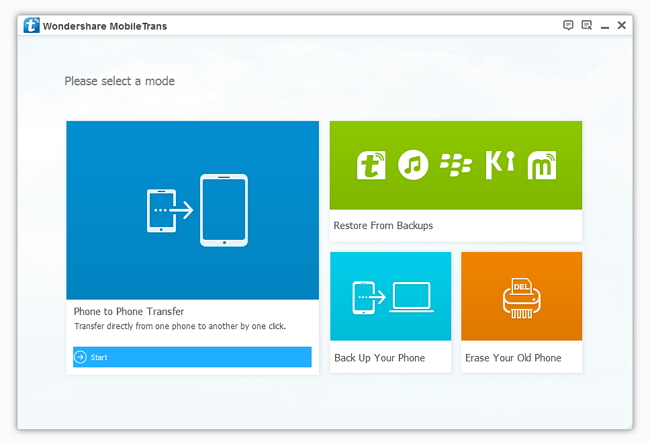
Step 1: Launch Phone to Phone Transfer

Install the iTunes and powerful Phone to Phone Transfer on PC. You are able to see two modes through the primary window. To move data between iPhones, you ought to choose the mode which is "Phone to Phone Transfer" and then click Start.


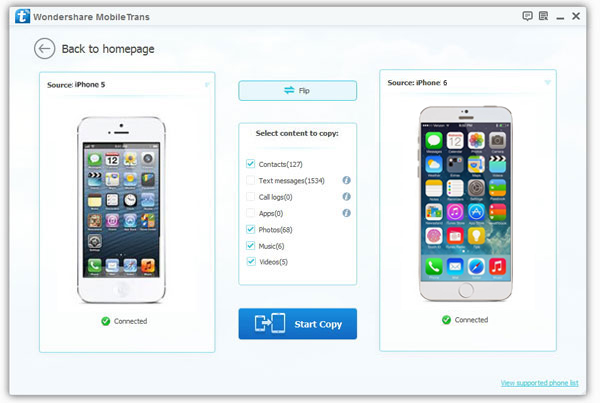
Step 2: Connect both old iPhone & new iPhone to the PC

Connect both your 2 iPhones to the PC by plugging into the Apple USB cables. Phone to Phone Transfer will detect 2 iPhones quickly and show you the transfer window of iPhone to iPhone.


Step 3: Transfer Whatsapp chat history from S4/5 to iPhone 6S

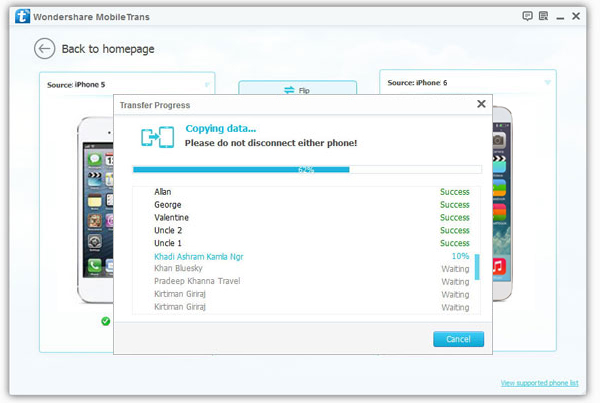
Click the start copy to transfer the phone whatsapp data as you wish. You can see the progress of the transfer in the dialog of pop-up. The whole process will take a few minutes. Your new iPhone will have the same data with your old one when it is finished.


More related articles 


How to Transfer Contacts from old iPhone to iPhone 6S
Recover Lost iPhone Contacts after iOS 9 Upgrade

----------------------------------------------------------------------------------------------------------------------------------